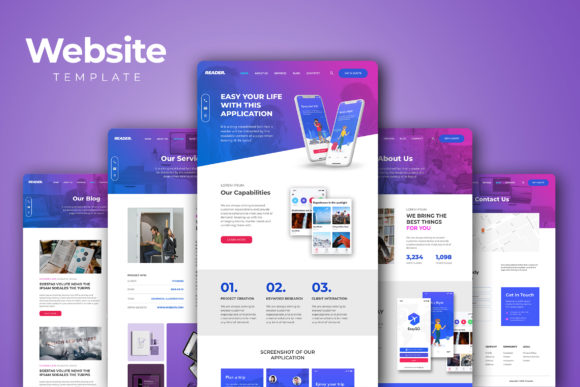
Website Template for Professional Websites
Creating a professional website doesn’t have to be a daunting task. With the right Website Template, you can build a polished, functional, and visually appealing site that reflects your brand’s identity and goals. This template is designed with versatility in mind, making it ideal for businesses, agencies, organizations, and even personal projects. Whether you're launching a company profile, showcasing a portfolio, or starting a blog, this template provides all the necessary tools and elements to get started quickly.
What Makes This Website Template Stand Out?
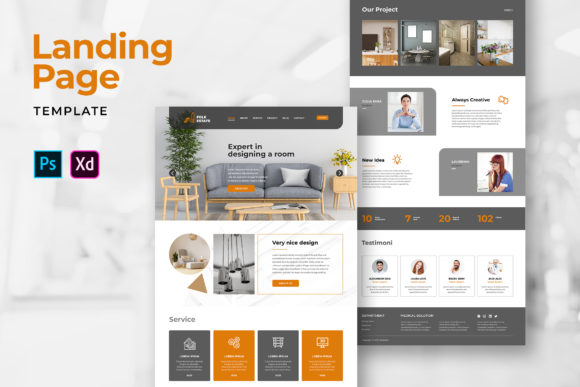
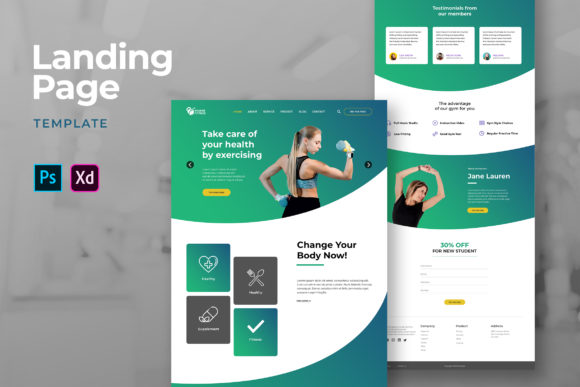
The Website Template offers a comprehensive set of features tailored for users who value both design quality and ease of customization. It includes essential pages such as Home, About Us, Services, What We Do, Blog, News, and Contact Us. These pages are structured using a smart layer-based approach, built on a 1140px grid system, ensuring consistency across devices and platforms.
One of the most significant advantages of this template is its adaptability. You can easily edit and customize it using Adobe Photoshop, Adobe XD, or Sketch. The RGB format color palette and high-resolution images (150 DPI, 1920 w × 8000 h px) ensure that your website looks sharp and professional on any screen size.
Additionally, the use of free fonts from Google Fonts and free icon fonts allows you to maintain a clean, modern aesthetic without the need for expensive assets. This makes it an excellent choice for freelancers, small business owners, and creative professionals who want to create a strong online presence without breaking the bank.
Creative Possibilities with the Website Template
The beauty of this Website Template lies in its flexibility. It can be adapted to suit a wide range of industries and purposes. Here are a few creative applications:
- Corporate Websites: Use the template to showcase your company's mission, services, team, and client testimonials. The clean layout helps establish trust and professionalism.
- Agency Portfolios: Highlight your best work, case studies, and client success stories. The template’s modular structure makes it easy to update and expand your content over time.
- Personal Blogs: Create a space where you can share your thoughts, experiences, and expertise. The blog section of the template is optimized for readability and engagement.
- E-commerce Sites: While not specifically designed for online stores, the template can be modified to include product listings, shopping carts, and payment integrations.
By leveraging the template’s customizable features, you can tailor it to fit your unique needs and style. For instance, a digital marketing agency might use vibrant colors and bold typography to reflect energy and innovation, while a law firm might opt for a more subdued and traditional look to convey trust and reliability.
Practical Tips for Customizing Your Website Template
To make the most of your Website Template, consider the following tips:
- Define Your Brand Identity: Before making any changes, think about your brand’s personality, values, and target audience. This will help guide your design choices and ensure consistency throughout your site.
- Use High-Quality Images: While the template comes with placeholder images, it’s important to replace them with original, high-resolution photos that align with your brand. These visuals should be relevant, engaging, and consistent with your overall theme.
- Optimize for Mobile Devices: Ensure that your site is responsive and functions well on mobile devices. Test your design across different screen sizes to guarantee a seamless user experience.
- Keep Navigation Simple: A clear and intuitive navigation menu helps visitors find what they’re looking for quickly. Avoid cluttering your homepage with too many links or options.
- Include Call-to-Action Elements: Encourage visitors to take action by adding clear calls-to-action (CTAs), such as “Contact Us,” “Sign Up,” or “Learn More.” These elements can significantly improve conversion rates.
By following these practical steps, you can transform the Website Template into a powerful tool that supports your business goals and enhances your online presence.
Real-World Examples of the Website Template in Action
Let’s take a look at how different users have successfully implemented the Website Template:
Example 1: A Freelance Graphic Designer
A freelance graphic designer used the template to create a personal website showcasing their portfolio, services, and client testimonials. They customized the color scheme to match their brand and added a blog section to share design tips and industry insights.
Example 2: A Small Business Owner
A local café owner utilized the template to build a simple yet effective website that included information about their menu, location, hours of operation, and upcoming events. The contact form made it easy for customers to reach out and place orders online.
Example 3: An Online Education Platform
An online education platform used the template to create a professional-looking website that featured course descriptions, instructor bios, and student reviews. The template’s modular structure allowed them to easily add new courses and update content as needed.
These examples demonstrate how the Website Template can be adapted to meet the specific needs of various industries and audiences.
Final Thoughts
The Website Template is a versatile and powerful tool that can help you create a professional website quickly and efficiently. Whether you're launching a new business, updating your personal brand, or expanding your online presence, this template provides the foundation you need to succeed.
With its customizable design, responsive layout, and rich set of features, the Website Template empowers you to build a website that reflects your vision and meets the needs of your audience. So why wait? Start customizing today and take your online presence to the next level.