Elevating Your Coffee Shop Facebook Cover: A Strategic Design Guide
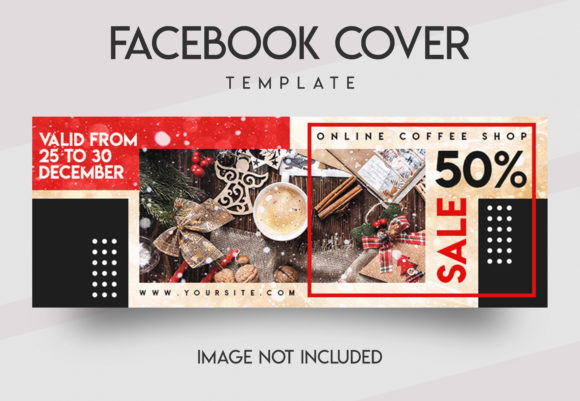
A Coffee Shop Facebook Cover serves as the digital storefront for your brand, acting as the first visual interaction potential customers have with your business on social media. Unlike standard profile pictures that are small and circular, the cover photo occupies a large, rectangular space at the top of your page. For a coffee shop, this real estate is not merely decorative; it is a critical marketing asset used to communicate atmosphere, daily specials, and brand identity. When you utilize a dedicated template designed specifically for this purpose, you gain access to a structured framework that simplifies the complex task of professional graphic design.
The primary distinction of a specialized Coffee Shop Facebook Cover lies in its tailored layout. Generic templates often force content into rigid grids that may not accommodate the unique flow of a café's branding. In contrast, a purpose-built template accounts for the specific dimensions required by the platform while prioritizing the visual hierarchy necessary to showcase coffee imagery, menu highlights, or location details effectively. This approach ensures that your promotional efforts remain cohesive across different devices, from desktop monitors to mobile screens where most users will view your page.
Comparing Template Approaches: Custom vs. Standardized Solutions
When evaluating options for your social media presence, business owners often face a choice between hiring a professional designer, using drag-and-drop online builders, or utilizing a downloadable Adobe Photoshop template. Each method offers distinct advantages and tradeoffs depending on your budget, technical skills, and long-term marketing goals.
Online Drag-and-Drop Builders
Platforms that offer web-based design tools provide immediate accessibility without requiring software installation. They are excellent for beginners who need a quick result. However, these tools often limit customization depth. You may find yourself restricted to pre-set color palettes or unable to manipulate complex layer effects that give a design a premium feel. While convenient, the resulting images can sometimes lack the unique character that defines a high-end coffee shop brand.
Hiring Professional Designers
Engaging a freelance designer or agency guarantees a fully custom result. This option allows for complete creative freedom and a unique visual identity that stands out in a crowded market. The downside, however, is cost and time. Revisions can be slow, and if you need to update a seasonal promotion next month, you may need to pay again for new designs. Furthermore, maintaining consistency over time requires ongoing communication and expense.
Premium Photoshop Templates
This middle-ground approach offers a balance of professional quality and user autonomy. A premium Coffee Shop Facebook Cover template provides the structural integrity of a professionally designed file without the recurring costs of a designer. These files are typically built with "smart objects," which allow you to replace placeholder images and text with your own content instantly. The design retains its professional aesthetic—featuring balanced typography, appropriate spacing, and high-definition resolution—while giving you full control over the editing process. For businesses that need to run frequent promotions or update their services regularly, this method is often the most efficient resource.
Key Features That Define Quality Templates
To make an informed decision, it is essential to understand what constitutes a high-quality template versus a basic download. A robust template should be more than just a static image file; it must be a functional tool. The following characteristics are indicative of a product that will serve your business well:
- Optimized Dimensions: Facebook covers require specific dimensions, typically 854 × 315 pixels for standard displays, though responsive viewing requires careful attention to how elements sit within the safe zone. A proper template is built to these exact specifications to prevent cropping issues on mobile devices.
- Layer Organization: Professional files are clearly layered and well-organized. This structure separates background elements, images, text, and decorative graphics onto individual layers. This separation is crucial for editing, allowing you to change one element without disturbing the rest of the design.
- Smart Object Functionality: This feature is the cornerstone of easy editing. Instead of manually resizing or masking images, smart objects allow you to double-click a layer to open your photo, place it inside the frame, and save it. The design automatically adjusts to fit perfectly, maintaining the original artistic intent.
- Color Mode and Resolution: Files should be set to RGB color mode and high definition (HD) to ensure crisp rendering on modern screens. Low-resolution files can appear pixelated, which undermines the credibility of a coffee shop trying to project a premium image.
- Font Integration: High-quality templates often include instructions for free fonts or specify exactly which typefaces are used. This ensures that the text remains legible and stylistically consistent when you customize the content.
Practical Application and Workflow
Implementing a Coffee Shop Facebook Cover template into your workflow is straightforward, yet it requires a few specific steps to ensure the best results. The process begins with understanding the environment in which you are working. Since these templates are designed for Adobe Photoshop, you will need access to this software. Once installed, the workflow generally involves three main stages: setup, customization, and export.
First, you must install any fonts specified in the template package. If the design relies on a specific typeface to convey a certain mood—such as a rustic serif for a bean roastery or a clean sans-serif for a modern espresso bar—the visual impact depends on having the correct font active in your system. Without this step, the text may default to a generic font, altering the intended design balance.
Next, open the PSD file and locate the smart object layers. These are usually marked with a distinctive icon. Clicking on them opens a temporary window where you can drop your own images. For a coffee shop, this might involve photos of your signature lattes, the interior of your shop, or a banner announcing a new pastry menu. Because the images are placed on separate layers, you can easily adjust the background or overlay text without affecting the core photography. This modularity allows you to test different layouts quickly.
Finally, once your images and text are in place, save the file in the appropriate format. Typically, a JPEG or PNG is suitable for Facebook, but saving a copy of the PSD file is advisable for future edits. It is important to note that while the viewer and layout examples often display high-quality stock photography, these images are not included in the purchase. You must provide your own assets, which gives you the opportunity to use authentic photos of your actual products and space, adding a layer of trust and transparency for your customers.
Evaluating Fit: When to Choose a Template
Determining whether a Coffee Shop Facebook Cover template is the right choice depends largely on your current resources and strategic needs. This solution is particularly advantageous for small business owners, franchise managers, or marketing teams who need to maintain a consistent brand look across multiple pages without a dedicated in-house design team.
If your goal is to launch a new location or refresh your brand for a seasonal event, such as a summer cold brew promotion or a holiday gift card campaign, a template offers speed and reliability. You can swap out the text and images in minutes, ensuring that your advertising materials are ready for publication immediately. This agility is often impossible when waiting for external design approvals.
However, there are limitations to consider. If your coffee shop has highly complex branding requirements that deviate significantly from standard design norms, a template might feel restrictive. Additionally, if you require animations or video content for your cover, a static Photoshop template will not suffice. In those cases, a video production service or a more advanced motion graphics tool would be necessary.
Furthermore, while templates simplify the design process, they do not eliminate the need for good judgment. The effectiveness of the final cover still relies on the quality of the photos you upload and the clarity of the message you write. A beautiful template cannot compensate for poor lighting in your product photography or confusing copy. Therefore, it is best viewed as a powerful tool that amplifies your existing assets rather than a magic solution that creates them from scratch.
Making the Final Decision
Ultimately, choosing a Coffee Shop Facebook Cover template is about balancing efficiency with quality. For many businesses, the ability to create professional-grade graphics quickly and affordably outweighs the benefits of a fully custom, expensive design service. By selecting a template that features clearly organized layers, smart object functionality, and professional typography, you equip yourself with a versatile asset that can adapt to various promotional needs.
Whether you are highlighting a new service, advertising a limited-time offer, or simply reinforcing your brand identity, the right template helps streamline your operations. It removes the technical barriers of graphic design, allowing you to focus on what matters most: serving great coffee and building relationships with your community. As you evaluate your options, prioritize tools that offer flexibility and ease of use, ensuring that your digital presence remains as dynamic and inviting as the experience you offer inside your shop.